
Tech Trends, Guides &
Product Insights
Discover expert advice, ultimate buying guides, and latest product releases across wireless audio, smart wearables, and mobile accessories.
Top Wireless Karaoke Microphones for Home and Events
A great karaoke night is rarely about volume alone. It is the clear lyric line, the chorus everyone can hear, and a microphone that stays comfortable through another song. A Wireless Karaoke Microphone can make a living room, backyard gathering, or small event feel more inviting. But the right choice depends on the room, the speakers, and who will use it. Sound and communication expert Julian Treasure says, “The human voice is the instrument we all play.” That idea matters here: a microphone should help voices sound natural, not merely louder.
This guide looks at top wireless karaoke microphones for home use and events, with practical details in mind. We’ll consider pairing and setup, battery life, handling noise, vocal effects, and how easily a second singer can join in. A handheld model may suit a lively family room; a system with a receiver may fit a more permanent setup. Small details matter. A microphone that feels heavy after two songs may disappoint, even if its feature list looks impressive. And “long range” claims can be less useful than a stable connection in your actual room.
There is no perfect pick for every singer. Some shoppers may care more about simple controls than studio-like sound, and that is reasonable. One limitation deserves attention: product specifications cannot fully predict how a microphone will sound with your speakers. The recommendations ahead offer a grounded starting point, not a promise that every setup will perform identically.
What Defines a Wireless Karaoke Microphone
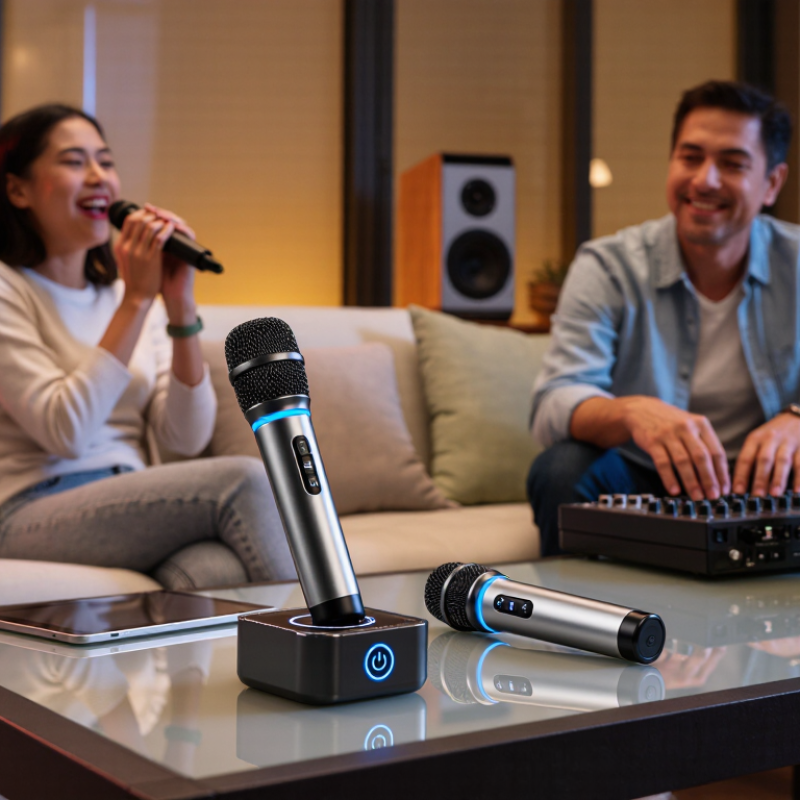
A wireless karaoke microphone combines a microphone capsule, a radio transmitter, and a receiver that connects to a speaker or mixer. Without a cable, singers can move around the room, but reliable performance depends on more than freedom of movement. Check the receiver’s output, the speaker’s input, and the system’s operating range before buying. A clear signal matters. The Bluetooth SIG’s 2024 Market Update forecasts 5.4 billion Bluetooth device shipments annually by 2028, reflecting the technology’s broad reach; however, Bluetooth support alone does not guarantee low latency or compatibility with every karaoke setup.
A useful microphone should reproduce voices clearly, resist handling noise, and offer controls that are easy to reach mid-song. Battery life and charging time matter at a long family gathering. So does feedback control: standing too close to a speaker can create a sharp squeal, even with a capable system. Wireless specifications can look impressive on paper, yet walls, crowded radio environments, and poor placement may reduce practical range. I’d test the microphone in the actual room; spec sheets cannot fully predict it.
Tips: Keep the receiver in open view, lower speaker volume if feedback starts, and test the connection before guests arrive. Leave charging time. It’s easy to forget.
How Wireless Microphones Transmit Karaoke Audio
A wireless karaoke microphone turns your voice into an audio signal, then sends it by radio to a receiver. The receiver converts that signal into an output your mixer, speaker, or karaoke system can use. A tiny delay matters. If the signal arrives late, singing along can feel oddly disconnected.
Some systems use digital transmission; others use analog radio. Digital models may reduce background hiss, while performance depends on design, distance, and interference. Walls, crowded wireless environments, and low batteries can weaken a connection. Keep the microphone within the receiver’s stated range, and avoid placing the receiver behind metal equipment. Before guests arrive, speak and sing from several spots in the room. Listen for dropouts, distortion, or noticeable delay. It is easy to assume a microphone is faulty when the real problem is placement. That is not always obvious.
For events, check that the microphone and receiver are paired and set to compatible channels. Use fresh or fully charged batteries, and keep a spare ready. Connect the receiver to the system’s microphone input, then raise levels gradually to avoid sudden loud feedback. Wireless audio is convenient, but it is not magic; a quick sound check often catches small problems before they interrupt a song.
Types of Microphones for Home and Event Use
For home singing, a handheld wireless microphone is the most familiar choice. Its built-in grille is easy to pass around, and the singer can move between the sofa and the screen without handling a cable. Dynamic handheld models also tolerate loud vocals well, though a speaker placed directly behind one can cause feedback. Keep it simple. For duets, a dual-channel receiver lets two microphones work through one system; check that each mic has independent volume control, especially when one singer is much quieter.
Headset and lavalier microphones suit hosts who need both hands free, but they capture more room noise and require careful placement. A headset keeps the capsule near the mouth; a lavalier clipped to a shirt can sound thin if it rubs against fabric. Bluetooth karaoke microphones combine a mic and speaker for casual use, but their small speakers may struggle in a busy room. Before buying any radio-based system, consider your local frequency rules and nearby wireless equipment. The U.S. Federal Communications Commission identifies 470–608 MHz as TV-band spectrum available for eligible wireless microphones, subject to restrictions; its 600 MHz band transition materials explain why frequency compatibility matters. Test reception in the actual room, with doors closed and guests moving around. It can still be imperfect.
Features to Compare When Choosing a Microphone
When comparing wireless karaoke microphones, check operating band, channel selection, and stated range before appearance. Walls, routers, and nearby microphones can interrupt a signal.
A clear setup guide should explain pairing and interference checks. Grand View Research estimated the global wireless microphone market at about US$2.1 billion in 2023, with projected growth through 2030. That figure describes market demand, not sound quality. Treat it as context, not a buying shortcut.
Test it live.
Battery life matters during a long party. Compare the claimed runtime with charging time, and check whether the microphone works while charging. A comfortable handle and well-placed controls help when singers pass it around.
Listen for harsh “s” sounds and feedback at your usual speaker volume.
Small details matter.
A cardioid pickup pattern may reduce sound from the sides, but room layout still affects results. Check for a receiver or direct speaker connection, plus compatible output types. If possible, test speech and singing from several feet away. I would not trust one impressive range number alone; walls and interference change real performance. A basic setup that is easy to repeat often beats extra features nobody can configure.
How to Set Up, Use, and Maintain a Karaoke Microphone
A wireless karaoke microphone works best when its receiver has a clear signal path. Place it beside the speaker, not behind a metal cabinet, and keep its antennas upright. Turn on the receiver, scan for a clear channel if supported, then pair the microphone according to its manual. Keep the speaker in front of the singer; this helps reduce feedback. Hold the mic about a hand’s width from your mouth and angle it slightly to soften breath sounds. Test it quietly. If the signal cuts out, move the receiver away from routers and other electronics, then try again. I still forget to check battery level before guests arrive.
Set volume with the speaker low, then raise it gradually; avoid shouting into the mic. NIOSH’s occupational noise guidance recommends no more than 85 dBA over eight hours, with allowable exposure time halving for each 3 dB increase. That is a workplace benchmark, not a home-event target. The WHO-ITU Global Standard for Safe Listening Venues sets a 100 dB LAeq, 15-minute limit for venues; treat this as an upper ceiling, not a comfortable listening goal. After use, switch off the system, wipe the handle with a soft, lightly damp cloth, and clean the grille only as the manual permits. Don’t soak it. Store the microphone dry, and charge or replace batteries as directed. If the grille smells musty, it may need more drying time before storage.
Top Wireless Karaoke Microphones for Home and Events - How to Set Up, Use, and Maintain a Karaoke Microphone
| Microphone Type | Typical Wireless Setup | Typical Operating Range | Power and Runtime | Best For | Setup and Use Tips | Maintenance |
|---|---|---|---|---|---|---|
| 2.4 GHz digital system | Handheld microphone paired with a compact receiver, often connected to a mixer or powered speaker. | Often about 30–50 m (100–165 ft) in open conditions; walls and interference can reduce range. | Usually rechargeable or battery-powered; runtime commonly varies from several hours to a full event. | Home karaoke, small parties, and simple portable setups. | Charge or install fresh batteries before use. Pair the microphone with its receiver, connect the receiver to a microphone input, and test the level before guests arrive. | Keep the receiver away from Wi-Fi routers when possible. Wipe the grille and body with a soft, slightly damp cloth; do not immerse the microphone. |
| UHF handheld system | Microphone transmits to a matching receiver; some receivers support two microphones and offer selectable channels. | Often about 30–100 m (100–330 ft) in open conditions, depending on the system, antennas, and surroundings. | Many models use replaceable AA batteries; actual runtime depends on battery type and transmitter design. | Events, larger rooms, and situations where stable reception and multiple microphones are useful. | Choose a clear channel, place the receiver in view of the performance area, and keep its antennas unobstructed. Connect the receiver output to a mixer or suitable audio input. | Remove batteries for long-term storage. Check antenna connections and clean the grille regularly to prevent dust and moisture buildup. |
| VHF handheld system | Handheld microphone paired with a dedicated receiver, typically using a fixed or limited set of frequencies. | Commonly suited to short-to-medium distances; obstacles and nearby radio equipment can affect reception. | Often powered by replaceable batteries; runtime is model- and battery-dependent. | Basic home use and uncomplicated, budget-conscious setups. | Keep the microphone within the receiver's recommended line of sight. Test for dropouts and unwanted noise from several positions before singing. | Store the microphone and receiver in a dry, padded case. Replace weak batteries promptly and avoid pulling on cables connected to the receiver. |
| All-in-one Bluetooth karaoke microphone | Self-contained microphone with a built-in speaker; commonly connects to a phone or tablet over Bluetooth. | Bluetooth audio connection is generally intended for nearby devices; the microphone's built-in speaker is for personal or small-room use. | Usually rechargeable by USB; playback and microphone runtime vary with volume and battery capacity. | Casual singing at home, travel, and quick setups without a separate receiver or speaker. | Pair it with the playback device, select the microphone as the sound source if needed, and start at a low volume to reduce feedback. For a bigger room, use an external speaker if supported. | Use the supplied or compatible charging cable and keep charging ports dry. Clean the grille gently and avoid charging in hot or damp locations. |
| Dual-microphone wireless set | Two handheld transmitters connect to one receiver with separate or mixed audio outputs. | Range depends on the wireless band and system; both microphones should be tested across the full performance area. | Each microphone needs its own charged battery or fresh batteries; runtime may differ between transmitters. | Duets, family karaoke, and small events with two singers. | Check that both microphones use compatible, non-conflicting channels. Balance their levels individually where possible and keep spare batteries ready. | Label the microphones for easy battery tracking. Clean each grille after use and store the microphones and receiver together in a protective case. |
| Selection checklist | Match the receiver connection to the available equipment: microphone input, mixer input, or a compatible audio interface. | Choose enough usable range for the room and expected movement; real-world range is lower when walls or interference are present. | Check charging method, battery availability, and stated runtime before an event. | Choose according to room size, number of singers, portability needs, and the available sound system. | Set microphone gain before increasing speaker volume. Hold the microphone a few centimetres from the mouth and point it away from speakers to help prevent feedback. | Keep equipment dry, avoid drops, and follow the manufacturer's cleaning and storage instructions. |
Range, battery life, and connection options vary by model. Published range figures are typically measured in open conditions and may be reduced by walls, interference, or receiver placement.
FAQS
It combines a microphone, a radio transmitter, and a receiver connected to a speaker or mixer. No cable needed.
Check the receiver output, speaker input, operating range, battery life, and charging time. Bluetooth support alone does not ensure compatibility or low delay.
Place the receiver in open view, with antennas upright. Keep it away from metal cabinets, routers, and other electronics. Test it in the actual room.
Keep it about a hand’s width from your mouth and angle it slightly. This can soften breath sounds and help keep your voice clear.
Move away from the speaker or lower its volume. Keep the speaker in front of the singer. Feedback can still happen with a capable system.
Start with the speaker volume low, then raise it gradually. Avoid shouting into the microphone. Loud rooms can make sensible levels hard to judge.
Turn off the system and wipe the handle with a soft, lightly damp cloth. Clean the grille only as its manual allows. Don’t soak it.
Test the connection quietly and check the battery level. Leave time for charging. I still forget this sometimes.
Conclusion
A Wireless Karaoke Microphone makes it easy to sing without being tethered to a speaker or audio system. It sends your voice through a wireless connection, typically using a receiver or a compatible audio device, so you can move around while performing. Different designs suit different settings: compact all-in-one models can work well for casual home sessions, while microphone-and-receiver setups may offer greater flexibility for gatherings and events.
When choosing a microphone, compare its connection range, sound clarity, battery life, controls, and compatibility with your existing equipment. Consider how many people will use it and where it will be set up. For a smooth experience, follow the pairing instructions, test the volume and connection before singing, and keep the microphone charged. After use, switch it off, store it safely, and clean it gently to help maintain reliable performance over time.

Blog Tags: