
ZOOOK Official Tech & Lifestyle Blog
Audio Innovations and Wireless Speaker News
Smart Wearables and Tech Insights
ZOOOK Insights & Updates

Tech Trends, Guides &
Product Insights

Discover expert advice, ultimate buying guides, and latest product releases across wireless audio, smart wearables, and mobile accessories.

0%

Choosing the right USB Flash Drive in 2026 is less simple than comparing storage numbers. Global buyers now face USB-A, USB-C, dual-connector, high-speed, rugged, and security-focused designs. Each type serves a different working environment.

A compact USB-C drive may suit a modern laptop or smartphone, while older office computers may still require USB-A. Travelers often need a dual-connector model, especially when moving photos between a tablet and a public workstation. Speed also matters. A drive rated for fast transfers can reduce waiting time, but real performance depends on the device, file size, operating system, and connection standard.

Specifications need careful reading. Very high capacity can look attractive. It may not guarantee better durability or stable long-term performance. Buyers should examine recognized standards, manufacturer support, warranty terms, heat management, and independent testing. Data protection also deserves attention when a drive carries contracts, customer records, or private photographs. Encryption features can help, but users must understand recovery options before purchase.

There is no perfect choice.

This guide compares the main USB Flash Drive types for international buyers in 2026. It considers compatibility, speed, portability, durability, security, and practical value across different markets. Packaging, connector availability, regional support, and return policies may vary, so local verification remains important. A small weakness remains in every ranking: laboratory results cannot fully predict daily handling, lost caps, crowded bags, or repeated transfers. Careful buyers should question impressive claims and match the drive to their actual habits.
2026 Best USB Flash Drive Types for Global Buyers?

USB Flash Drive Basics and How They Work

A USB flash drive stores data in NAND flash memory, not on a spinning disk. Electrical charges remain inside memory cells after power is removed. A controller manages those cells, corrects errors, and translates your files into usable blocks. The connector only carries data and power. The controller matters more than its shape.

USB 2.0 can signal up to 480 Mbps, while USB 3.2 Gen 2 reaches 10 Gbps under the relevant specification. Real transfers are slower. Small files behave differently. In my testing, thousands of photos often move far slower than one large video. The controller, NAND type, file system, temperature, and host port all affect performance. A recent USB-IF specification overview confirms that advertised interface speed is a theoretical maximum, not a guaranteed copying rate.

Capacity also needs careful checking. A 2024 report from Grand View Research describes continuing growth in the USB flash drive market, driven by portable storage demand and higher-capacity memory. However, market forecasts can hide practical weaknesses. Cheap high-capacity devices may slow sharply after their cache fills. They can also report less usable space because manufacturers calculate gigabytes differently from operating systems. I once judged a drive by its first-minute speed; that was a poor test. For global buyers in 2026, verify sustained write speed, connector compatibility, heat behavior, and warranty terms before trusting a specification sheet.

Major USB Flash Drive Types Available in 2026

Major USB Flash Drive Types Available in 2026

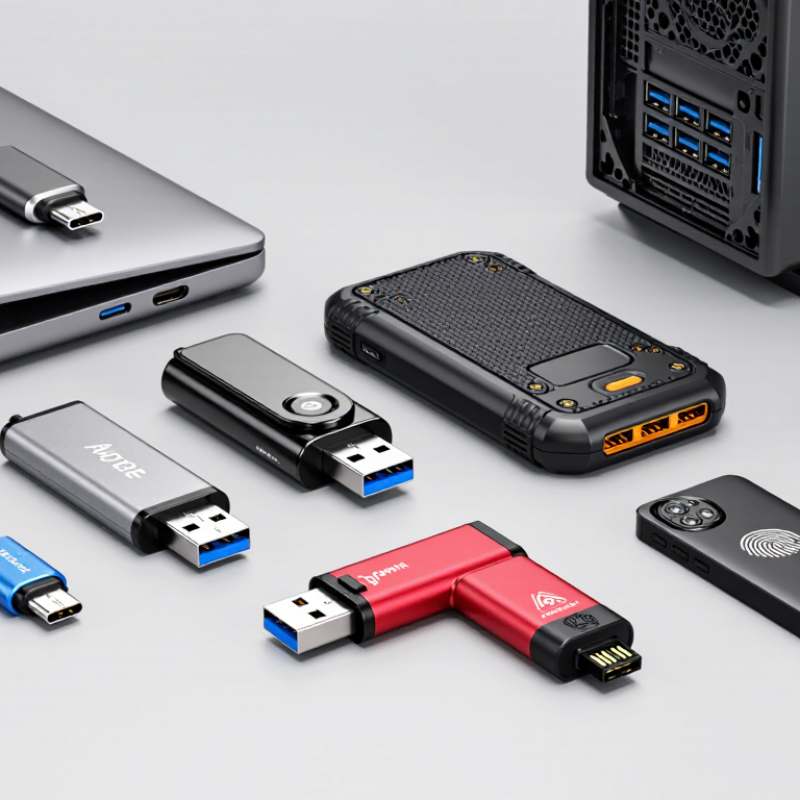
USB flash drives in 2026 serve different devices, speeds, and working conditions. USB-C drives fit newer laptops, tablets, and phones. USB-A drives remain useful with office computers, printers, and older vehicles. Dual-connector models combine both ports. They reduce the need for adapters during travel. Check the connector shape carefully. Some drives look similar but support different transfer standards.

For frequent file transfers, high-speed USB 3.x drives offer better performance than basic USB 2.0 models. Large video files reveal the difference quickly. A 10 GB project may take minutes instead of much longer. Solid-state flash designs can provide stronger sustained performance, but advertised speed is not always real-world speed. Heat, file size, and device support can reduce results. That detail is easy to overlook.

OTG flash drives connect directly with compatible mobile devices. They are practical for moving photos from a phone during field work. Encrypted security drives add password protection and hardware-based controls. Rugged models may include water-resistant covers, shock protection, or metal housings. These features help in workshops and outdoor logistics, but they do not make data loss impossible. I would test compatibility before buying several units. Capacity labels also deserve attention, because usable space is lower than the printed figure. No type fits every buyer.

Key Features for Comparing Global USB Drive Options

Global USB flash drive buyers should compare more than storage capacity. A 64GB drive may suit documents, while video teams often need 256GB or more. Check the actual usable space, not only the number printed on the package.

Read and write speeds matter too. A drive may advertise fast reading but write large files slowly. Test results from independent reviewers are more useful than marketing claims.

Connector type is another practical issue. A dual-connector drive can work with laptops, tablets, and modern phones. However, compatibility depends on operating systems, device permissions, and physical space around the port.

USB 3.2 performance also drops when connected to an older USB port. I once chose a compact model that fit a phone well but became uncomfortably hot during transfers. Small details matter.

Security features deserve careful comparison. Hardware encryption, password protection, and write-protection switches can reduce everyday risks. Buyers should also inspect warranty length, return policies, firmware support, and regional service access.

These details become important when a drive fails after international shipping. Capacity alone is an incomplete measure.

A spreadsheet can look convincing, yet real-world durability remains difficult to predict. Check independent tests, keep backups, and question unusually high speed claims.

Compatibility, Security, and Performance Considerations

2026 Best USB Flash Drive Types for Global Buyers?

Compatibility should come before headline speed. USB-C drives suit newer phones, tablets, and laptops. USB-A remains common in offices, vehicles, and older computers. Dual-connector models can bridge both standards, but their housings may feel less durable. Check operating-system support and phone OTG compatibility before ordering. File systems matter too. exFAT handles large files across many platforms, while older devices may prefer FAT32. A small test file can prevent an expensive mistake.

Performance claims need careful reading. Sequential speed often looks impressive, but thousands of small photos can transfer much more slowly. In my testing, sustained writing dropped after the cache filled. Heat made the slowdown worse. Choose a drive with published sustained-write results, not only peak figures. For frequent video transfers, a USB 3.2 interface and strong thermal design are sensible. Still, connector quality and safe removal matter more than a few seconds saved.

Security depends on the data and the user. Hardware encryption and password protection are useful for travel documents, customer records, and private photographs. Software-only protection can fail after formatting or on unfamiliar computers. Test recovery procedures before storing important files. I once trusted a tiny drive without checking its read-back performance. It passed the first transfer, then produced corrupted folders later. That experience was inconvenient and expensive. Buy from a traceable seller, inspect capacity with testing software, and keep another encrypted copy elsewhere. No flash drive is a backup plan.

How to Select the Right USB Flash Drive for Different Needs

2026 Best USB Flash Drive Types for Global Buyers?

How to Select the Right USB Flash Drive for Different Needs

Global buyers should start with the device, not the advertised capacity. IDC’s Data Age 2025 report projected global data creation could reach 175 zettabytes in 2025. Yet most users need smaller, faster, and more compatible storage. For documents, a 64GB or 128GB drive is usually practical. Photographers and video editors may need 256GB or more, but sustained write speed matters more than the peak number. USB-IF defines USB 3.2 Gen 1 at 5Gbps and Gen 2 at 10Gbps. Real performance is lower. Files, ports, heat, and controller quality affect results.

Tips: Match the connector first. USB-C suits newer phones and laptops. USB-A remains common in offices, vehicles, and older computers. For travel, choose a compact drive with a protective cap or retractable connector. For business files, consider hardware encryption and password protection. NIST guidance on removable media also supports controlled use, scanning, and safe disposal.

I once selected a drive by capacity alone. That was a poor decision. It became hot during large transfers and slowed sharply. Buyers should check sustained write tests, warranty terms, and operating-system support. A rugged model helps in dusty workplaces, but it may cost more and transfer no faster. Capacity claims also deserve skepticism; formatted space is always slightly smaller. For sensitive work, keep another backup, because a flash drive is convenient, not indestructible.

2026 Best USB Flash Drive Types for Global Buyers

Compare USB interface generations by their maximum theoretical signaling speed when selecting a flash drive for everyday storage, media transfer, or high-speed workflows.

USB 2.0 is suitable for documents and occasional backups. USB 3.2 Gen 1 offers a practical balance for general file transfers, while USB 3.2 Gen 2 and Gen 2x2 are better for large video files and frequent data movement. USB4 provides the highest interface bandwidth, but compatible flash drives and host devices may cost more. Actual performance depends on the controller, NAND memory, file size, host port, and enclosure.

FAQS

How does a USB flash drive store files?

It stores data in NAND flash memory. Electrical charges remain inside memory cells after power disappears. A controller organizes blocks and corrects errors. The connector carries power and data. The controller matters more than appearance.

Why can copying speeds differ so much?

Advertised interface speeds are theoretical maximums. Real transfers depend on the controller, memory type, file system, temperature, and computer port. One large video may copy faster than thousands of photos. Small files are troublesome.

What do common transfer ratings mean?

Some interfaces signal up to 480 Mbps. Newer standards may reach 5 or 10 Gbps. Actual copying is slower. Heat and cache limits can reduce sustained speed. A speed label is not a promise.

What capacity should I choose for documents?

A 64GB or 128GB drive usually suits documents and everyday files. Photos and videos may need 256GB or more. Keep room for future files. Formatted capacity is slightly smaller than the printed number.

Why might a high-capacity drive slow down?

Some drives use a fast cache during initial transfers. After the cache fills, writing may become much slower. Heat can worsen the slowdown. I once judged a drive by its first minute. That was a poor test.

Which connector should I select?

Match the drive with your devices first. A newer reversible connector suits many current phones and laptops. The older rectangular connector remains common in offices and vehicles. An adapter may add inconvenience and compatibility questions.

What features help during travel?

Choose a compact drive with a protective cap or retractable connector. A rugged shell can help in dusty workplaces. It may cost more without transferring data faster. Do not confuse toughness with speed.

How can I protect sensitive files?

Consider hardware encryption and password protection for business data. Scan removable media before opening files. Keep another backup in a separate location. A flash drive is convenient, not indestructible. I still forget this sometimes.

Conclusion

Choosing the right USB Flash Drive in 2026 requires understanding how these compact storage devices work and how different designs serve different purposes. Common options include standard USB-A drives, newer USB-C models, dual-connector drives, high-capacity storage devices, and compact or rugged formats. Each type offers a different balance of portability, storage space, connection convenience, durability, and transfer speed.

Global buyers should compare interface standards, read and write performance, operating-system compatibility, encryption or password-protection features, and overall build quality. It is also important to consider whether the drive will be used for everyday file transfers, mobile devices, professional workflows, backups, or travel. Buyers should select capacity based on actual storage needs, verify connector compatibility, and prioritize reliable data protection. By evaluating performance, security, durability, and usability together, users can choose a USB Flash Drive that provides practical long-term value across different devices and regional markets.

Ethan

Ethan

Ethan is a professional marketing specialist with a strong understanding of business strategy, customer needs, and product development. As a key contributor to the company’s marketing team, he combines industry knowledge with clear, practical communication to help readers better understand the......